My Holmatro App FAQ
About Holmatro
Below are the answers to the frequently asked questions for the MyHolmatro app. Can’t find the answer to your question?
Which tools can be connected?
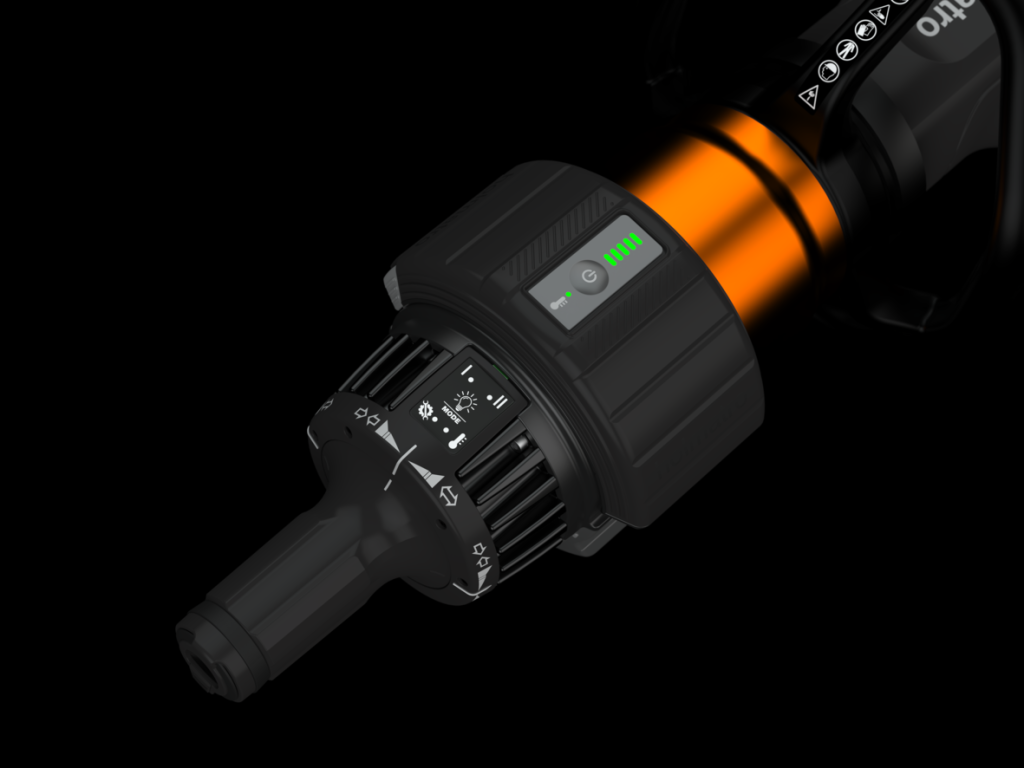
All tools from the next-gen Pentheon series. These tools can be identified by the user interface shown below.
How do I connect a Pentheon tool to the MyHolmatro app?
To add a next-gen Pentheon tool, press the “+” on the “Tools” tab in the app. Ensure the Pentheon tool is on and that the MyHolmatro app has Bluetooth access on your device. The app will prompt you to enter a “pass key” displayed on your device during connection. Once connected, the Pentheon tool will appear in the “connected tools” section.
The tool is connected but does not respond. What should I do?
After 10 minutes of inactivity, the tool enters sleep mode, although the battery may still show lights. Switch the tool back on to reactivate the tool and then pressing the “connect” button in the app for the specific tool.
How many devices can the tool connect to simultaneously?
The tool can connect with only one MyHolmatro app at a time. The MyHolmatro app on iOS can connect to up to ten devices simultaneously, while the Android version can connect to between four and eight devices, depending on the mobile hardware and software version.
Why is it necessary to create an account to perform a self-check?
The requirement to create an account is linked to data safety protocols. We store data on the tool during the self-check, and having an account ensures that this process adheres to data safety standards.
Which mode should be used for self-check?
The self-check automatically selects mode II for testing and then returns to your previously selected mode after the self-check.
How do I create a Holmatro Account?
- To perform a self-check, it’s necessary to sign in. The app will guide you to a sign-in page. Follow the instructions to sign in. After signing in, you can perform a self-check.
- If you don’t have an account, select ‘Sign up now’. A new form will appear. Follow the instructions to create an account. Once your account is created, you can perform a self-check.
- To reset your password, choose ‘forgot your password’. Complete the form as instructed. Your email will be verified before you can reset your password.
How can I remove my Holmatro Account?
Open the settings page in the MyHolmatro app and press on ‘Delete my account’ link or send an email to privacy@holmatro.com with subject ‘Request deletion of your account’.
Why do I sometimes need to log in again?
This is due to the expiration of certificates.
Which devices are compatible with the app?
- iPhone: iOS 15.6 or later
- iPad: iOS 15.6 or later
- Android Phone: Android 10 or later
- Android Tablet: Android 10 or later
Note: Issues may arise when using the app on an Android device due to thousands of combinations of different hardware, screen sizes, and OS versions. Naturally, we test a wide array of combinations to ensure the app functions on a broad range of Android devices
How do I identify a next-generation Pentheon tool?
A next-generation Pentheon tool can be identified by its user interface, which features modes as shown below.
Why does the tool always start in stage 5?
This is normal; the tool starts in stage 5 and scales down to stage 1 based on workload.
What does “sector” mean in the motor/pump display?
The term refers to the mechatronic motor-pump drive system in Pentheon tools, designed to evenly distribute wear across all 8 pump plungers, thus extending pump life. It’s crucial that the pump operates in different sectors periodically.
How can I update the firmware?
Firmware updates can only be done by a certified Holmatro technician. Contact your local dealer or your local partner for assistance.
I cannot find my question in this FAQ. What should I do?
Submit your question via the contact form or contact your local dealer or your local partner.
Which languages are supported?
The MyHolmatro app supports English, Dutch, German, French, Portuguese, and Spanish. Change the language under “settings”.
Can I switch between metric and imperial measurement systems?
Yes, you can switch between metric and imperial systems. Go to ‘Measurement system’ in the ‘settings’ tab.
I don’t see any tools in the MyHolmatro app. What should I do?
Connect the tool with an iOS or Android mobile phone or tablet to use the app’s functionalities.
My tool is not connecting. What should I do?
- Ensure Bluetooth range is within 30 feet (10 meters) and no obstacles interfere.
- The tool should be powered on and not connected to another device.
- Check if the battery is charged.
- Confirm Bluetooth is enabled on your device.
Make sure you have the next-gen Pentheon series tools. These have a Bluetooth dongle and are identifiable by their user interface:
Why can’t I see real-time data in the MyHolmatro app?
Connection loss between your device and the tool might occur after shutdown. Reactivate the connection by turning the tool on and then pressing the “connect” button in the app for the specific tool.